Showing posts with label Artikel. Show all posts

Friday, October 31, 2014

Cara Koneksi VB Ke Excel

Cara Koneksi VB Ke Excel - Update kali ini farray akan berbagi artikel tentang bahasa pemrograman vb.net. Buat sobat pembaca yang suka buat program atau memang menggeluti dunia programming, mungkin artikel dari nubie ini udah pada tau.
Cara Koneksi VB Ke Excel

Friday, October 25, 2013

Cara Memperbaiki Komputer Suka Restart Sendiri

Cara Memperbaiki Komputer Suka Restart Sendiri - Ini berawal dari komputer temen gue yang suka restart sendiri. Ketika dia sedang memakai komputer, tiba-tiba komputernya restart sendiri. Hal ini terjadi berulang kali. Lalu dengan sok pinter gue mencoba buat nolong dia.

Cara Memperbaiki Komputer Suka Restart Sendiri

Langkah-langkah memperbaiki Komputer yang suka restart sendiri


- Scan Komputer, sapa tau banyak virusnya. Setelah nunggu beberapa lama, ternyata komputer dia ga da virusnya. Hadeh, apanya y....? Coba berpikir lagi layaknya tukang servis profesional :D...

- Pengecekan selanjutnya yang gue lakuin adalah periksa kabel-kabel power sama kabel ide, siapa tau ada yang bermasalah. Disini gue cabut semua kabel lalu gue pasang-pasang lagi, lalu nyalain komputer. Ternyata tetep ga ngaruh apa-apa.

- Langkah selanjutnya adalah cek power supply komputer siapa tau udah lemah. Selesai melakukan pegecekan dan ternyata hasilnya power supply dalam kondisi fit :D.

- Akhirnya gue putusin buat instal ulang komputer aja, dan temen gua setuju. Pertama proses instalasi berjalan normal, tetapi ditengah-tengah installasi progres barnya ga tambah-tambah, hadeh.... apa lagi ini... :(. Scan virus udah dilakuin, instal komputer juga, pikir-pikir cari jawabannya sampai lumayan pusing juga :D.

- Langkah berikutnya gue coba pakai hardisk lain dan langsung gue instal ulang lagi, dan ternyata nemuin problem yang sama seperti problem instal ulang diatas.

- Langkah terakhir ini yang ternyata memberikan pencerahan dan solusi buat gua sama temen gue... Alhamdulillah setelah berusaha lumayan lama akhirnya diberi jalan keluar yang dapat menyelesaikan masalah gue sama temen gue. Pasti pada penasaran kan... wkwkwk... Slow aja sob, tenangkan diri dulu, ga usah terlalu serius... hehe...

Setelah beberapa langkah diatas gue lakuin dan ga berhasil, gue bawa tu cpu ke tukang servis yang asli (ga abal-abal kaya gue :D). Setelah dicek sama si tukang servis, dia ngomong kalo salah satu hardware ada yang bermasalah, yaitu motherboard yang udah lemah dan solusinya biar komputer bisa normal lagi ya ganti motherboard.

Akhirnya setelah motherboard diganti komputer normal lagi kaya biasanya :). Nah mungkin sobat pembaca ada yang mengalami problem yang sama kaya temen gue, coba lakuin langkah-langkah diatas, atau kalo ga mari kita diskusikan sama-sama dengan ninggalin komentar dibawah, insha Allah akan farray bantu :). Oy jangan lupa tolong share ke temen-temen yang lain juga ya... he...

Terima kasih gue ucapkan. karena udah bersedia mengunjungi blog ini dan membaca artikel yang ada dalam blog ini. Jangan lupa untuk selalu berkunjung  ke sini jika sobat sedang browsing ya... :D

Tuesday, October 22, 2013

Cara Koneksi VB Ke Excel

Cara Koneksi VB Ke Excel - Update kali ini farray akan berbagi artikel tentang bahasa pemrograman vb.net. Buat sobat pembaca yang suka buat program atau memang menggeluti dunia programming, mungkin artikel dari nubie ini udah pada tau.

Cara Koneksi VB Ke Excel
Sekedar deskripsi singkat aja, disini farray mencoba berbagi cara koneksi vb ke excel. Bahasa pemrograman yang farray pakai vb.net 2010 express (pake yang free aja lah... :D) dan office 2007. Oke langsung aja liat videonya berikut ini y...


Kalo pengin ngintip cource codenya, silahkan baca selengkapnya dibawah ini, Enjoyed... :)

Imports System.Data.OleDb
Public Class Form1
    Dim cn As OleDbConnection
    Dim cm As OleDbCommand
    Dim da As OleDbDataAdapter
    Dim dt As DataTable

    Private Sub Form1_Load(ByVal sender As System.Object, ByVal e As System.EventArgs) Handles MyBase.Load
        'BUKAN KONEKSI KE DATABASE 'testfile.xls' (LOKASI 'testfile.xls' DI LOCALDISK 'C:')
     cn = New OleDbConnection("provider=Microsoft.Jet.OLEDB.4.0; Data Source=c:\testfile.xls;Extended Properties=Excel 8.0;")
        cn.Open()

        da = New OleDbDataAdapter("select * from [Sheet1$]", cn)
        dt = New DataTable
        da.Fill(dt)

        'SETTING DATAGRIDVIEW1
        With DataGridView1
            .AllowUserToAddRows = False
            .BorderStyle = BorderStyle.None
            .DataSource = dt
            .Columns(0).HeaderText = "Id"
            .Columns(1).HeaderText = "Nama Agen"
        End With

        cn.Close()
    End Sub
End Class

Ini ScreenShoot data yang ada di textfile.xls

Connect to excel with visual basic 2010
Dibawah ini ScreenShoot form setelah dijalankan.

cara koneksi vb ke excel
Cara koneksi vb ke excel

Demikianlah artikel Cara Koneksi VB Ke Excel dari nubie, semoga dapat bermanfaat buat kita semua. Tolong jangan lupa like, comment dan share ke yang lainnya he... Sekian dari farray, semoga hari sobat menyenangkan... :)

Wednesday, September 25, 2013

5 Genius Ways To Launch Products Through Social Media


Posted: 23 Sep 2013 01:15 PM PDT
One of the best things about social media and marketing fragmentation is that you get to launch products and services for free or minimal amount (vs traditional TV ads and billboards). You get to be exposed with a wider worldwide audience.
Here are some brilliant ideas on how you can make a good entrée to the market using social media.

1. Facebook

Facebook Likes
With over a billion users worldwide (hundred million of which are from the United States), you have a larger than life audience that you can reach out to for the product you are introducing to the market.
In addition to releasing teaser photos, behind the scenes of creating the product and contests, you should also be focusing on creating a profile and fan page for your business, web site, blog and personal brand.
If you want to spread the word quickly, Facebook is the go-to platform.

2. Photo Contest

An inexpensive way to build buzz on your new product is through a photo contest. Bank on men's innate love for pictures and sharing these.
You can use a Facebook app for this. Winners will be determined by way of popular votes. Don't get surprised if you get thousands of entries, visits views and votes in a couple of days.
Photo contest theme should be relevant to the product that you are about to launch.

3. Infographic

Infographics are visual representations of different concepts, histories, timeline and stories of anything and everything under the sun. These normally carry stunning visuals engage readers.
For you to create interest in your new product or service, a well-designed infographic can be a useful tool. Need some ideas for awesome infographics? Just use Google Images and search for “infographics”, you’ll be surprised what you find.
Google Infographics

4. Twitter's Vine App

A sneak peak of the product via a video teaser with Twitter's Vine app can spur interests from several active users. Teasers should have a length of no more than 60 seconds ideally. Some of the most viral activity being spread around social networks and among friends right now is all content through Vine. Jump in the Vine bandwagon while it’s just getting started.
Vine Videos and Blogging

5. Email A "Founders List"

Email Promotions
There is still power in email marketing. Create a specific and unique email template that will include a line that says "this email is only sent to selected recipients and founding members of the organization" – it will make them feel important that you are featuring them in your latest blog list or promotion. People love to belong in a special group and have bragging rights, and it works out great for the person building the list because they will get social shares from a lot of people they are promoting as well.
The monumental shift of consumers' purchasing power was greatly influenced by social media. Gone are the days when a company can easily put damage control to leaks of bad service or defective products. Facebook, Twitter and other social networking sites have become the refuge of consumers with unpleasant experiences. Similar is true when a person raves about getting a superb purchase.
Implement these fun and exciting ways to connect with your blogging audience and watch your followers and numbers continually grow over time.

Posted: 23 Sep 2013 11:19 AM PDT
Following the Penguin and Panda Google Updates, guest blogging has become a massive part of online life.
Do you use guest bloggers to produce content?
Have you shied away from using them due to lack of quality?
Do you feel that guest bloggers are only after one thing?
The truth is that guest bloggers can be useful.  If you have a relatively small team for writing then guest bloggers are able to produce the additional content you need to push your website that step further.
Some excellent contributions from guest bloggers really can enhance your blog or website, and if you have a regular pool of quality contributors, you can have a bank of content ready for you at all times.

10 ideas for getting the most out of your guest bloggers.

Blog
Blog
1 – Request Ideas
If you have an offer from a potential writer to guest blog for you then first of all request some ideas.  They may be able to provide you with some samples of former content and some really good ideas that fit well with your website.  If they don't get your website, they won't get you decent content so say "thank you very much but no".
2 – Get Topics Agreed Before Writing
Often we find that our guest posters produce content that's very good but doesn't work with our website.  It's therefore important to agree beforehand the themes and topics within the pieces to ensure that you get what you need.  Synergy is key.
3 – Select Bloggers Carefully
There are so many people out there looking to guest post on good sites that the volume makes it easy to be selective.  You have to have a process in place to ensure that you wean out the lower quality bloggers and develop a bank of high quality contributors.  Be willing to say "no" or ask for a re-edit.
4 – Be Clear About Expectations
In our business we receive many posts that are run of the mill standard posts without an angle and without any interest.  Explain exactly what you expect on your blog.  You may want thousand word plus posts with no links in the content, and no promotion, but allow a link in the bio.  Whatever your expectations ensure that you are clear about them in your communicated criteria on your site and in responses to guest posters.
5 – Request Images and Multimedia
Often websites get guest posts that are excellent but just miss the mark because they don't have infographics, statistics, images, or anything that raises the tone of the content to the premier league level.  Ensure that you ask your guest bloggers to contribute these additional resources and that you get resources that are royalty free and therefore can be used.
6 – Quiz Them about Your Website
It's well worth finding out how much the guest bloggers know about your website so that they can communicate to you that they have actually understood what you are all about.  By understanding the audience on your sites guest bloggers will hit the mark and will help you to enhance your brand.  If, however, they really don't get what you are all about, their content will not be received very well by your website audience.
7 – Work with the Guest Blogger Directly
It's always best to work directly with guest bloggers who are looking for a place to put their content. When you are working with PR agencies or SEO companies you'll often find that the content gets written by people other than the person you're speaking to.  This means that you have to constantly reiterate points and the relationship that you are building in is not with the person that is actually developing the content.
8 – Don't Waste Your Time
Don't waste your time on guest posters that aren't going to cut the mustard.  You can set your expectations and standards, make some suggestions, but if they are not getting it then just move on and say "no".  There are plenty of guest bloggers out there looking to contribute for your business so ensure that you find those; spend time getting the best of the best.
9 – Ensure Exclusivity
You should always ensure that the content that's going up on your website is unique for you and not being recycled or used on other websites.  Duplicate content can be penalized in Google and certainly will have little merit in terms of your website brand development.  It could even be worse, as you may get associated with another website that contains the content and damage your brand through this association process.
10 – Provide Feedback
It really is important to get feedback in any walk of life.  As someone taking guest blogs it is your feedback process that will lead to improving content and improving relationships with your guest bloggers.  Demand change requests and enhancements but do so in a constructive way explaining that you want the best content you can for your website and that you want to develop an ongoing relationship where the guest blogger understands what you want, what you need, and what you expect.
Using guest posters is a great way to get high quality content on a regular basis. Formalize a process for your online properties, and make the most of the opportunity to use highly talented and knowledgeable writers without having to spend a penny.

Posted: 23 Sep 2013 07:00 AM PDT
As of June 2013, the total outstanding consumer debt in the United States alone was a mind-boggling $2.8 trillion. That’s a lot of money being owed and there are a lot of people out there who are absolutely crushed by this debt. They’re struggling to make payments and they’re not really sure where to turn. And that’s why there are services like those offered by National Debt Relief that help these people lower their monthly payments and avoid bankruptcy. And yes, you can cash in on this rising trend too via their affiliate program.

What Is National Debt Relief?

National Debt Relief is a Better Business Bureau-accredited business that helps regular consumers get out of debt without having to take out a debt consolidation loan. They are the first and only debt relief company in the US to be accredited by the BBB, giving consumers a sense of confidence that they’re being treated fairly. National Debt Relief recognizes that the people burdened with unsecured debts can have a hard time making payments and these people know that they need some help, but they’re not sure where to turn.
debt1
That’s where you can step in by helping to promote the services offered by National Debt Relief. I’ll get to the finer details of the affiliate program in just a moment, but the idea here is that National Debt Relief offers debt settlement and debt negotiation, forming debt reduction plans for its customers that lower their balances, reduce their monthly payments and help them get out of debt sooner. Your debt gets consolidated so that you only have one affordable monthly payment.
Indeed, National Debt Relief says that it is one of the lowest cost solutions for debt relief. And you don’t need an excellent credit score to qualify for these services, unlike some debt consolidation loans on the market. The average American doesn’t expect to be debt-free until the age of 53, but with services like these, you can achieve that goal sooner and more easily.

The Affiliate Program

The National Debt Relief affiliate program is geared in such a way that it’s a win-win-win situation all around. The consumer gets connected with a service that will help them reduce payments and get out of debt sooner. National Debt Relief gets a new customer. And you earn yourself a healthy commission for providing the referral.
debt3
There are several aspects and avenues to the affilate program that you can explore. You can earn $25 for every qualified lead that you send their way. This is when the lead fills out a six-field online form that takes only a minute. If the qualified lead makes the phone call, you can earn $38 via the Pay Per Call program with the opportunity to increase that payment to up to $50 per qualified call. The newest addition to the affiliate program is the Pay Per Sale program and this is where it is the most lucrative: you can earn $300 per sale. If you refer just ten sales a month, that’s an extra $3,000 in your pocket.

Blogging Your Way to Success

When you consider some of the other niches in the market, you may have to work a little harder to convince your site visitors to follow through with a form, a call or a sale. Someone casually browsing a smartphone website isn’t necessarily going to click through on a link to buy the newest iPhone. Debt relief is different.
If someone is actively looking for advice about debt relief, debt consolidation, and debt settlement, they’re really motivated to fix this problem. Given the size of the debt relief market in the United States, you have a huge opportunity here to make a sizable amount of money from a relevant blog on this topic. Perhaps you could offer some advice about how to better manage your money and refer visitors to National Debt Relief for further assistance.

Sign Up with CJ or SAS

The National Debt Relief affiliate program is powered by two of the most popular affiliate marketing networks on the Internet today, so signup is a straightforward and easy process. You can sign up through Commission Junction or ShareASale. The programs, as far as I can see, are the same on the two networks and it offers the highest EPC on CJ and SAS for debt. If you’re going to capitalize on this market, this is the way to go for your debt-related blog.

How to Protect Your WordPress Content From Copyright Infringement


Posted: 23 Sep 2013 05:21 AM PDT
copyright infringement
Copyright infringement is a serious problem for WordPress creatives. We'll look at how users can make infringement more difficult and whether they should.
For those of us who make a living producing content for the web, copyright is often at the forefront of the issues that generate the most controversy. The freedom with which information can be propagated through the network is fundamental to the functioning of the online information economy, but no one likes to see the content that they've worked hard to create disproportionately benefiting free-riders.
Ultimately, there's very little creators like writers, photographers, and videographers can do to prevent their copyright being infringed by dedicated and technically astute copiers. If content is out there, it can be taken and republished without permission. However, we can make it so that infringers have to jump through a few hoops and that's often enough to discourage the casual sharer.
We need to take some care with how much we discourage the sharing of our content though. Content curation and sharing on social media are major channels through which creatives generate awareness of their work. Being too restrictive can backfire. No one is happy to see their content misused, but some infringement may need to be accepted as the price paid for exposure.
For example, a photographer may be displeased by the idea of their work appearing for free all over Pinterest and Tumblr, but, provided they are properly attributed, that dissemination can be a huge source of traffic back to their own site. Whether proper attribution occurs is another issue entirely and has more to do with proper education of Internet users than enforcement, most people will attribute properly if they are aware of the issues and those who happily ignore the etiquette of attribution aren't likely to be source of income for creatives.
That said, there are several methods of making copyright infringement more difficult if content owners are so minded.

WP-CopyProtect

copyright infringement
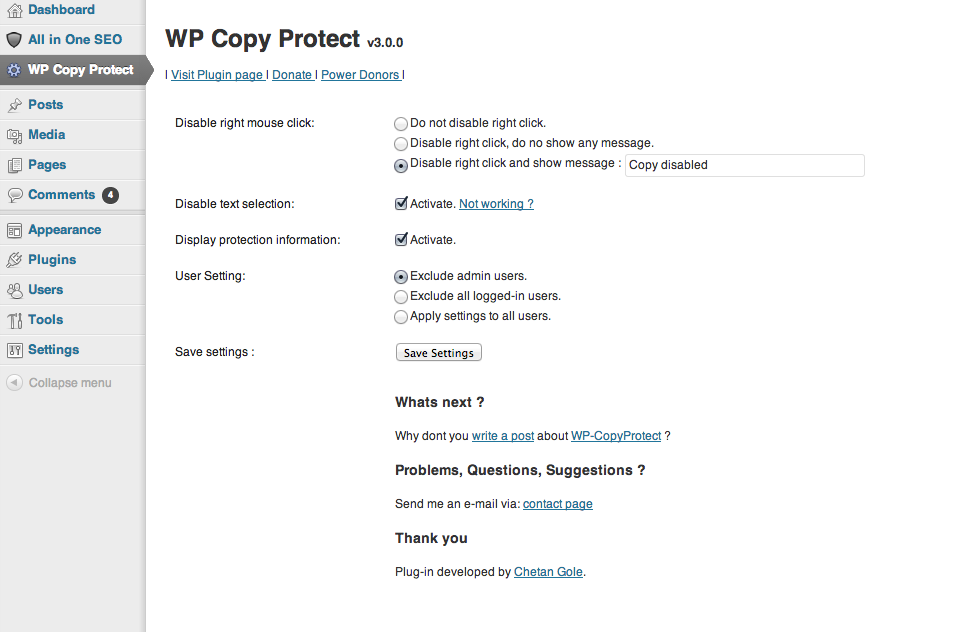
WP-CopyProtect prevents the copying of content from WordPress sites in two ways. Firstly, it prevents the selection of text. Most casual copiers will just copy and paste from the page. If they can't select text it's difficult for them to copy it. Secondly, the plugin disables the right click menu, which is where the copy command and the "save image" command usually live. These options can be controlled separately.
Neither of these techniques is foolproof; both can be easily overridden by anyone with a modicum of technical knowledge and this sort of passive aggressive enforcement runs the risk of irritating site visitors by disabling browser features.

Tynt

copyright infringement
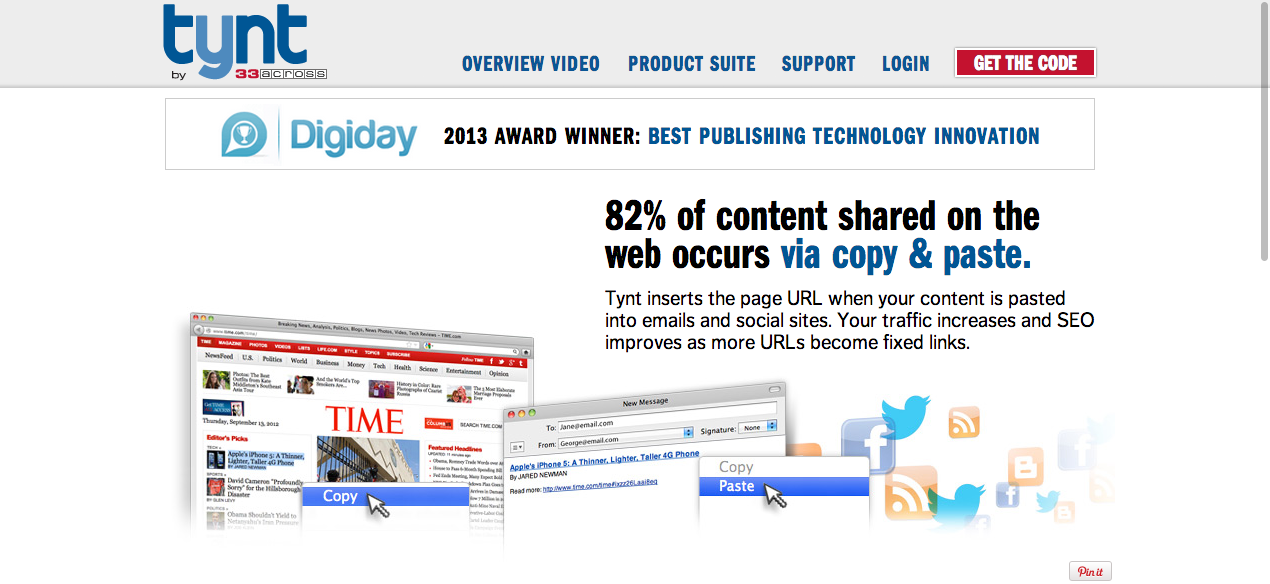
Tynt is a service that appends URLs and a tracking code to the end of copied text, so that when it's pasted into another document the attribution is automatically attached. The benefit of this is that you don't have to disable copy and paste features, you make it easier for users to properly attribute, and the generated links can have positive effect on SEO; all of which assumes that the copier doesn't simply delete the attribution link.
Again, you run the risk of irritating users by making their copy and paste functions behave in unexpected ways, but if you want to give it a whirl on your WordPress site, try the Easy Tynt plugin.

Watermark WP Image Protect

copyright infringement
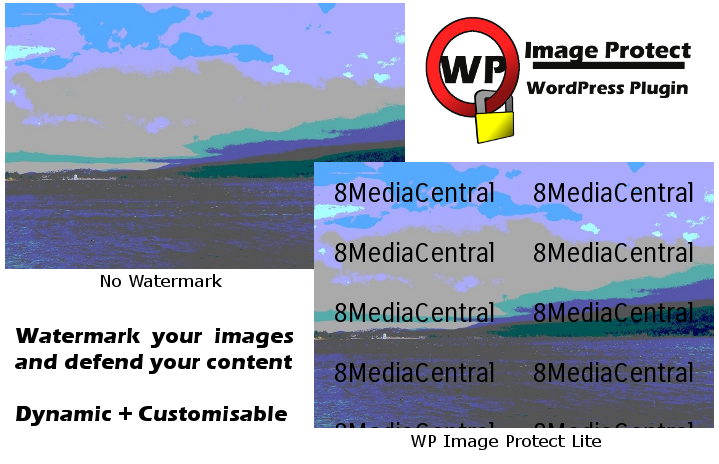
This plugin is a very easy way to add configurable watermarks to images. It allows you to choose the text, font, color, and size of your watermarks. Watermarks are added dynamically, and they doesn't affect the original image.
WordPress users who implement these and other techniques for protecting their content are walking a fine line. As with much copy protection, it's the user's experience that suffers, and so the effort might end up doing more harm than good. Additionally, none of these techniques are difficult to circumvent for anyone who can read a page of HTML. Each creative has to balance the pros and cons and decide for themselves.
Graeme works as an inbound marketer for Nexcess, a leading provider of Magento and WordPress hosting. Follow Nexcess on Twitter at @nexcess, Like them on Facebook and check out their tech/hosting blog, http://blog.nexcess.net/.
Lead mage via opensourceway
The post How to Protect Your WordPress Content From Copyright Infringement appeared first on The Blog Herald.

Wednesday, September 18, 2013

Blogging Tips


Blogging Tips


Posted: 16 Sep 2013 06:32 AM PDT
As site owners and bloggers it’s very important for us to make sure that we are always improving our own online reputations and those of our sites. A blog or any business' online reputation is often influenced by how well it optimizes the web and social platforms available. There are countless factors that come into play such as creating search engine-friendly content, smoothing out a webpage's back-end coding structure, and appearing in guest blogs. However, it is important to note for small, hometown businesses that what is online is just as important as word of mouth marketing.
As mobile gains an edge, search engines are pushing for local, location-based results for queries. This way, users are able to utilize onboard apps for tracking down a storefront, finding contact info and calling directly from a page, and checking out online reviews. One of the best ways to optimize for this market, according to a recent article on Search Engine Watch, is to play up Google+ Local and Places.
Google Places for Business

The Place for Business

Google Places is a way to add business listings to search queries. More likely than not, any given business will already show up in one aspect or another. But like with any other Web-based marketing tactic, it is important for you to take complete control of how people find and view your company. First, Places has companies provide accurate contact information before entering a verification process.
Businesses also have the opportunity to register for AdWords directly through Place's Business Bungalow, or control panel. AdWords is a pay-per-click service that can help a company's inorganic search results by pulling up a listing in a query. You're able to target demographics and adapt keywords to changing markets, but business' will find these campaigns expensive without natural, organic search results power.
Check out Brand's Command Center to see how they build a network of positive reviews and incoming news and links to their customers. Even if you aren’t looking to improve your branding or online reputation through paid services, the chart below will still give you a good idea of how you can surround yourself and your blogs with positive articles and link building around your sites. Integrating new content, search engine tracking, knowing when/where your band is mentioned and continually building new incoming links are all great ways to improve your brand/blog awareness online.
Brand Command Center

Local Focal Points

Google+ Local is more of a social media platform than a listing service. However, every scrap of exposure helps in the long run. By creating a business page/profile, you are able to circle up with industry-related companies and connect with consumers just like you would on Facebook, LinkedIn, and Twitter. However, unlike these other social media platforms, Local is Google-friendly. When an everyday user queries a search for a clothing store in their area, for example, results with Local tie-ins increases the chance of upping page rankings. But as mentioned before, it is important for companies to cover all of their bases instead of counting on one service rather than another.
Google Local

The Rule of Two

For almost every enterprise out there, it is helpful to register both Local profiles and Place listings. The more control you have over your own brand's positive online exposure the better. In essence, both platforms allow companies to share business NAP info (as in name, address, and phone numbers), company images, comments, and reviews. According to Search Engine Watch, the most important feature out of the two are Google Map listings, an advantage even Web-based businesses can use by adding URLs and consumer ratings.
Whether you are an online blog, personal brand or a land based local business, be sure to take advantage of all the link building and branding opportunities you have at hand to better improve your reach and reputation online.

Copyright © 2013 Blogging Tips. This Feed is for personal non-commercial use only. If you are not reading this material in your news aggregator, the site you are looking at is guilty of copyright infringement. Please contact us so we can take legal action immediately.
The post Using Google Places for Business to Improve Your Blog Reach appeared first on Blogging Tips.

Monday, September 16, 2013

Menampilkan Komentar Google Plus dan Blogger


Menampilkan Komentar Google Plus dan Blogger - THEMASDOYOK.COM


Posted: 13 Sep 2013 07:31 PM PDT
Bagaimana Cara Menampilkan Komentar Google+ dan Blogger? - Mungkin banyak pertanyaan serupa di benak sahabat blogger. Seperti kita tahu, komentar Google+ memang memiliki beberapa daya tarik yang tidak dimiliki komentar bawaan blogger.

Tombol +1
Komentar yang bagus bisa di plus oleh pengunjung. Komentar bawaan tidak memiliki opsi thumbs up atau thumb down.

Terintegrasi dengan Google+
Ketika Anda bagikan artikel ke Google+, pengunjung dapat memberikan komentar langsung dari Google+. Selain itu secara default komentar yang di berikan oleh pengunjung melalui blog Anda juga akan otomatis tampil di dinding halaman Google+ mereka. Hal seperti ini memungkinkan memancing lebih banyak komentar.

Tapi di sisi lain sebagian blogger tidak bisa beralih dari komentar Blogger karena berbagai alasan. Salah satunya adalah karena Komentar Google+ yang tidak memberikan opsi untuk berkomentar dengan non Google. Dan beberapa kekurangan lain, misal susahnya berkomentar lewat versi mobile, atau komentar Google+ yang tidak muncul di feeds. Selengkapnya: Komentar Google+ Banyak Kekurangan

Nah, mungkin solusi terbaik adalah dengan mempertahankan dua macam mode komentar ini. Tutorial pemasangannya tidak saya tulis sendiri, karena saya sudah menemukan artikel yang sangat jelas dari sahabat saya +Kang Ismet di blognya. Silahkan baca artikel berikut: Menampilkan Komentar Google+ dan Blogger secara Bersamaan.

Semoga bermanfaat. Selamat berakhir pekan.
Info artikel: Menampilkan Komentar Google+ dan Blogger dan Blooger

Hanya Iblis Yang Senang Dengan Wafatnya Ulama


Sarkub


Posted: 15 Sep 2013 07:13 PM PDT
Umat islam pada umumnya dirundung duka dengan silih bergantinya para ulama Indonesia yang wafat belakangan... more »

Pentingnya Selektif Memilih Ulama


Sarkub


Posted: 13 Sep 2013 11:51 PM PDT
Oleh: Ust. Taufiq bin Abdul Qadir Assegaf Assalamualaikum wr.wb. Segala puji bagi Allah yang telah... more »